
JCO 1080P HD Panoramic Indoor Camera, Wireless Wifi IP Security Surveillance Sys


JCO 1080P HD Panoramic Indoor Camera, Wireless Wifi IP Security Surveillance Sys
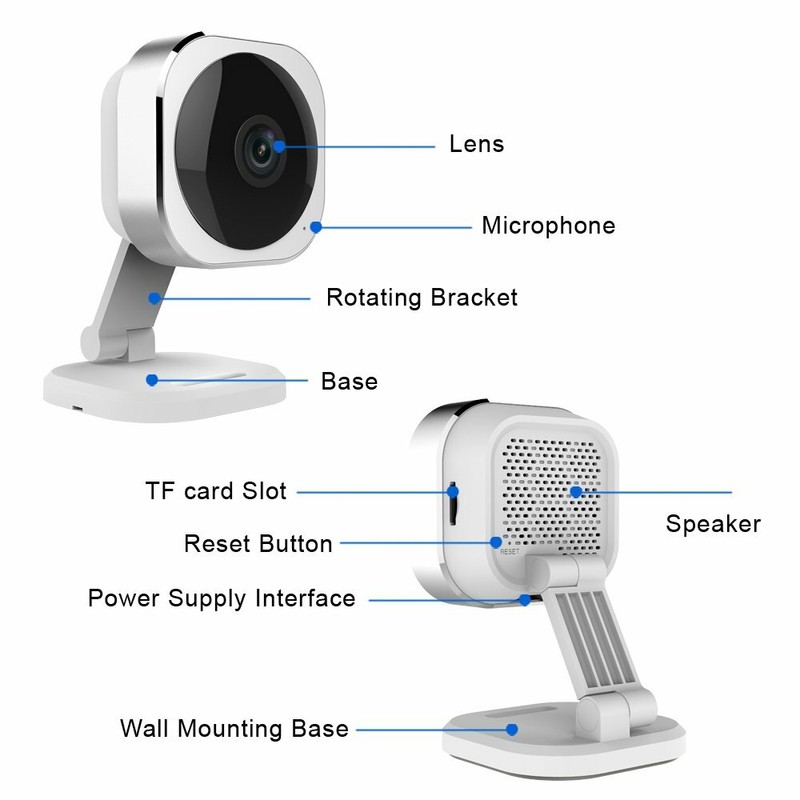
[1080p HD Panoramic with Super Night vision] More clearly capture every corner of a room day and night with a very wide field of view. It is a great option when you want to watch a large room and don't want to set up multi cameras[Electronic Pan Tilt Zoom] Abandon a slow, noisy, high failure motor used in traditional pan tilt zoom cam, ePTZ technology with advanced algorithms, let you instantly position and keep track of moving object without lagging or missing.[Excellent Two-way Audio] 360 Degree noise-canceling hypersensitive microphone and stereo sound provide much clearer voice quality. You can freely communicate with people in the live video like a phone call[Easy Setup] Just download free APP and Plug N Play, then you can view the live videos on your smartphone anywhere (Available for iOS and Android). If failed, pls reset cam or contact our local customer service printed on the packing box[Dual Storage Options] Our cloud service passed the highest level of security proved by qualified professionals, safely stores your continuous video history even your camera is stolen. You can also buy a Micro Sd card (max 128G) to save monthly feeProduct descriptionAbout us:JCO electronics is experted in security surveillance field for 16 years.We have a complete set of departments of production, research and development, design and so on. We hear ideas from our customers, swiftly response to customize our product. Welcome to start your wonderful trail from using our smart home camera. Carry your home on your smartphone! If you have any good idea or question in using our camera, please just contact us. We’ll do our best to help you.Note:* 2.4Ghz network is required, If you use 5G Wi-Fi router, make sure you never close 2.4Ghz band manually, our camera will automatically connect 2.4GHZ band.* Mobile OS: iOS 7.0+ (iPhone, iPad), Android 4.0+* High-Speed Internet Connection (1.5Mbps+)* This camera have to connect the power when you use it. Cause there is not built-in rechargeable battery supply in the camera.* This camera doesn’t support special character in your Wi-Fi password or Wi-Fi name, please change it and re-connect.* Following conditions please reset the camera: A) When the first installation failed B)change the Wi-Fi name or password ;C)replace the router ;D)change the admin user(The previous user needs to remove the camera from App)Steps:1)Download “Danale“ APP from App Store (iOS) or Google Play (Android)2)Power for Camera near your router ( Once the camera is connected with WiFi, and shows "online" on Danale app, you can move it to other places where has a good wifi signal.)3)Creat an account on "Danale" App,then follow steps in app. 4) If failed, please try to hold down the"Reset" button around 8 seconds until you hear a reminding "reset successfully". Then repeat the above steps to setup again.Troubleshooting1. Camera can’t connect Wifi when firstly setup.* Make sure your smartphone have connected your Wi-Fi already!* Plug in your camera into a power outlet that is close to your router.* Enter the correct Wi-Fi user name and password.* if connection fails, pls try to reset the camera more times. After a long time using, the camera is offline and cannot view remotelyFirstly, refresh the camera list by pulling down the APP window. If still can’t recover. check and do following steps:A. Check if the camera is placed within the Wi-Fi signal range, If yes, please recoverB. Check if the camera is power off or not. If yes, please recoverC. Check if the WIFI router works. If yes, please recoverD. Check if the WIFI router name and WIFI password changed recently? If yes, please use the reset tool to reset the camera and do the connection again with the new WIFI router name and password.E. If not the above questions are checked. repower the camera and 2 minutes later, run the APPASIN B073X4VKXVItem model number 1080P HD Panoramic Indoor camera
Specifications
| Return Shipping Will Be Paid By | Buyer |
| All Returns Accepted | Returns Accepted |
| Item Must Be Returned Within | 30 Days |
| Refund Will Be Given As | Money Back |
| Features | Wi-Fi |
| Location | Indoor/Outdoor |
| Resolution | 1080p |
| Smart Home Compatibility | Google Assistant |
| Surveillance Technology | IP/Network |
| Power Source | Battery |
| Battery Included | Yes |
| Model | SmartCam |
| Compatible Brand | ADT |
| Connectivity | Wireless |
| Brand | JCO |
| Color | Clear |
| Smart Home Protocol | Wi-Fi |
| Type | Panoramic |
[1080p HD Panoramic with Super Night vision] More clearly capture every corner of a room day and night with a very wide field of view. It is a great option when you want to watch a large room and don’t want to set up multi cameras[Electronic Pan Tilt Zoom] Abandon a slow, noisy, high failure motor used in traditional pan tilt zoom cam, ePTZ technology with advanced algorithms, let you instantly position and keep track of moving object without lagging or missing.[Excellent Two-way Audio] 360 Degree noise-canceling hypersensitive microphone and stereo sound provide much clearer voice quality. You can freely communicate with people in the live video like a phone call[Easy Setup] Just download free APP and Plug N Play, then you can view the live videos on your smartphone anywhere (Available for iOS and Android). If failed, pls reset cam or contact our local customer service printed on the packing box[Dual Storage Options] Our cloud service passed the highest level of security proved by qualified professionals, safely stores your continuous video history even your camera is stolen. You can also buy a Micro Sd card (max 128G) to save monthly feeProduct descriptionAbout us:JCO electronics is experted in security surveillance field for 16 years.We have a complete set of departments of production, research and development, design and so on. We hear ideas from our customers, swiftly response to customize our product. Welcome to start your wonderful trail from using our smart home camera. Carry your home on your smartphone! If you have any good idea or question in using our camera, please just contact us. We’ll do our best to help you.Note:* 2.4Ghz network is required, If you use 5G Wi-Fi router, make sure you never close 2.4Ghz band manually, our camera will automatically connect 2.4GHZ band.* Mobile OS: iOS 7.0+ (iPhone, iPad), Android 4.0+* High-Speed Internet Connection (1.5Mbps+)* This camera have to connect the power when you use it. Cause there is not built-in rechargeable battery supply in the camera.* This camera doesn’t support special character in your Wi-Fi password or Wi-Fi name, please change it and re-connect.* Following conditions please reset the camera: A) When the first installation failed B)change the Wi-Fi name or password ;C)replace the router ;D)change the admin user(The previous user needs to remove the camera from App)Steps:1)Download “Danale“ APP from App Store (iOS) or Google Play (Android)2)Power for Camera near your router ( Once the camera is connected with WiFi, and shows “online” on Danale app, you can move it to other places where has a good wifi signal.)3)Creat an account on “Danale” App,then follow steps in app. 4) If failed, please try to hold down the”Reset” button around 8 seconds until you hear a reminding “reset successfully”. Then repeat the above steps to setup again.Troubleshooting1. Camera can’t connect Wifi when firstly setup.* Make sure your smartphone have connected your Wi-Fi already!* Plug in your camera into a power outlet that is close to your router.* Enter the correct Wi-Fi user name and password.* if connection fails, pls try to reset the camera more times. After a long time using, the camera is offline and cannot view remotelyFirstly, refresh the camera list by pulling down the APP window. If still can’t recover. check and do following steps:A. Check if the camera is placed within the Wi-Fi signal range, If yes, please recoverB. Check if the camera is power off or not. If yes, please recoverC. Check if the WIFI router works. If yes, please recoverD. Check if the WIFI router name and WIFI password changed recently? If yes, please use the reset tool to reset the camera and do the connection again with the new WIFI router name and password.E. If not the above questions are checked. repower the camera and 2 minutes later, run the APPASIN B073X4VKXVItem model number 1080P HD Panoramic Indoor camera


